LoneStar Casino



Platform Overview
| Casino Type | Sweepstakes |
| Website | lonestarcasino.com |
| Launched | 2025 |
| Restricted States | |
| KYC | Yes |
| Banking Options |

|
| Mobile App | No |







| Number of Games | 500+ |
| Categories | Crash Jackpots Slots Video Poker |
| Exclusive Titles | 0 |
| Live Games | 0 |
| Responsible Gaming Tools | Yes |
| RNG Testing | Yes |
| Verified Payouts | Yes |
| Legal Basis | U.S. Sweepstakes Model |
| Data Encryption | Basic HTTPS active; SSL type unspecified |
| Terms & Conditions | 18+ | New Players Only | T&C Apply |
| Signup Bonus | 100K GC + 2.5 SC |
| Wagering Requirement | 1x |
| Other Promotions | Daily login, Referral Bonus, Mail-in AMOE, Social Media Bonuses |
| VIP Program | Points-based VIP system |
| Redemption Methods |


|
| Minimum Redemption | $100 |
| Payout Time | 1-3 business days |
| Min. Purchase | $2.99 |
| Currencies | Gold Coins Sweeps Coins |
| Fees | 0 |
| Total Studios | 16 |
| Full List | 4ThePlayer Booming Games Evoplay Entertainment Fantasma Games Gaming Corps Jini Studios Kalamba Games Nolimit City Octopus Pragmatic Play Red Rake Reel Riot Relax Gaming Rogue Slotmill Swintt |
| Email Address | [email protected] |
| Live Chat Hours | N/A |
| Hotline | N/A |
| Social Media | Facebook X (Twitter) Instagram Youtube |
We conduct independent research to protect our players from fraudulent sweepstakes sites
 Statista
 Trustpilot
 App Store
 Google Play
 Reddit
 Consumer Affairs
LoneStar Casino Review 2026: The Login, The $2.99 Buy & Is It Legit?
If I were to describe Lone Star Casino in a nutshell, I’d say it’s low-key but reliable. It’s also a bit secretive about where its value lies, as it does not bombard you with messages of how great it thinks it is. But does that mean I should officially recommend this site to you.
🏁 Quick Verdict: LoneStar Casino
Best For: Budget Players ($2.99 Entry) & Workhorses
🛡️ Legit Barometer: ▮▮▮▮▮▮▮▮▯▯ 83%
If you only read one thing, read this: LoneStar Casino Online is a legitimate platform backed by RealPlay Tech that makes you work for every free coin it gives out. Absolutely nothing is automated. Grinders will love it; lazy folks won’t. It’s a newer site, which explains why you’ll only find around 500 games in the lobby, but they’re all high quality. Its big appeal is that it is one of the cheapest sites to buy coins; packages start at just $2.99 (versus the usual $20).
🏆 Best Feature: $45 Gift Card Exit (Lower than the $100 cash requirement)
⚠️ Warning: No Live Chat (Support is handled via email forms only)
💰 The Deal: Scaling Referrals (Earn up to 70 SC based on friend activity)
⭐ Rating: 8.3 / 10
✅ CLAIM 2.5 FREE SC NOW ➤Who Should Play (and Who Should Skip) LoneStar Social Casino
✅ Best for:
- Anyone chasing scaled referral rewards (up to 70 SC).
- Low-stakes players wanting to use a daily SC drip (0.30 SC/day).
- Budgeteers needing low entry purchase ($2.99 tier).
- Multi-device + multi-task players (login sync holds).
- Self-acclaimed manual redeemers wanting to track their SC progress (10K SC/day cap).
⚠️ Not ideal for:
- Anyone wanting to be able to communicate with support via live chat, or using SMS support (only form/inbox).
- Those who want instant redemption (manual KYC, up to 48h).
- Anyone finding it thrilling chasing sweepstakes promo codes (only 2 fixed bonus deals on site).
- Players wanting a visual coin tracking feature (wallet lacks bar or ETA).
LoneStar Casino Login and Account Setup (Signup Steps + Phone Verification Gate)
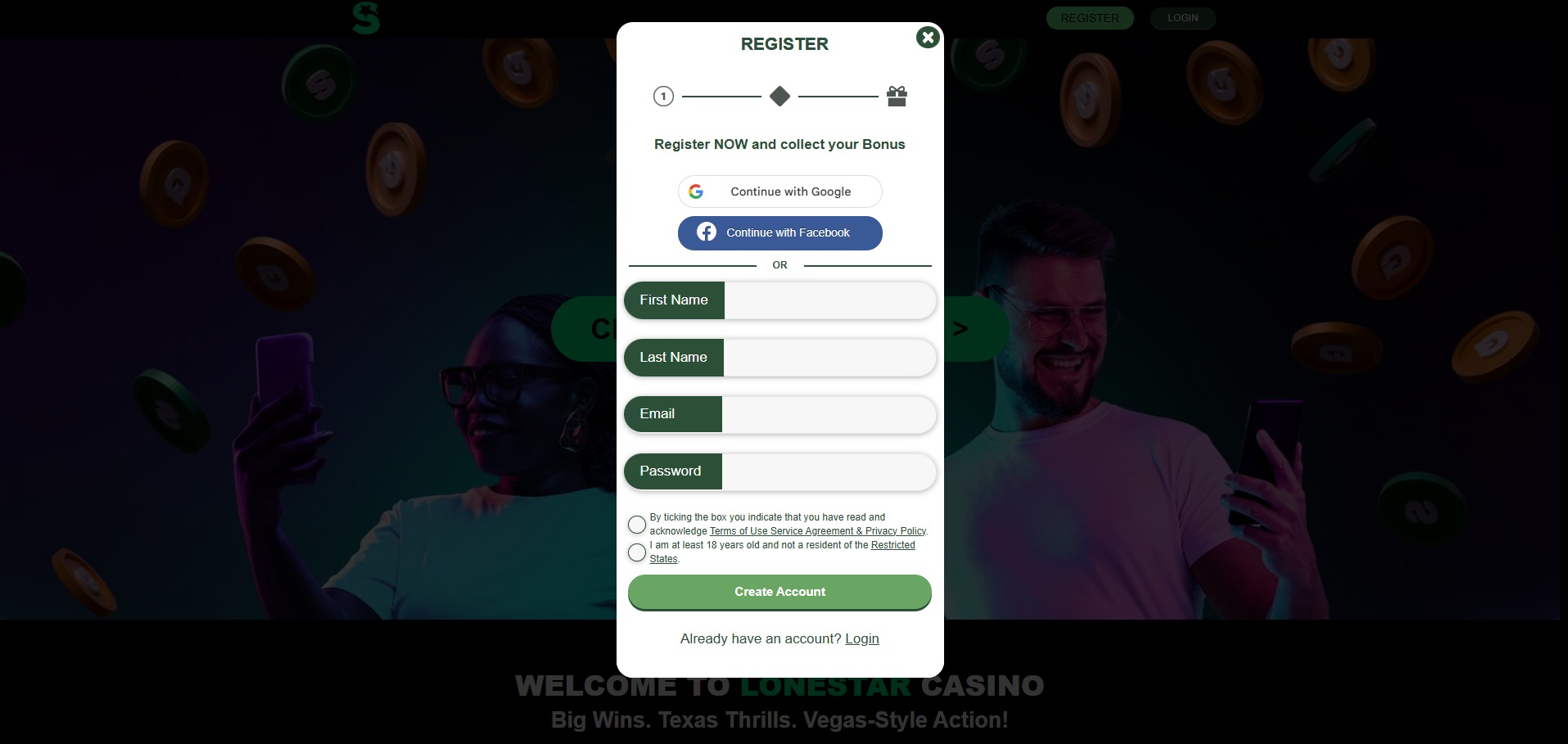
Source: lonestarcasino.com > Signup
Fast signup flow, but the code screen gives almost no feedback
 8.7/10
Pros
- Name + email required before phone prompt
- Phone verification blocks access to lobby
- Autofill supported on all tested browsers
- Email + phone fields stay on reload
- No password needed to reach phone check
- Session syncs across store and inbox
Cons
- Code input gives zero confirmation
- Submit error doesn’t explain what failed
- Session timeout happens with no warning
💬 Comment: The verification process at LoneStar is uncluttered, but this clean design has a few blind spots. There’s a proper gate, but no signposting. If they improve just the feedback, this setup could feel much more secure.
What Signing Up at LoneStar Looked Like on My End
LoneStar starts with a name and email form. After that, a code gets sent by email. Once entered, the page moves to phone number input. That has to be completed before anything else loads — including the lobby.
There’s no access to games or menu until all three steps clear. The inputs stay in place across reloads.
ID check doesn’t appear until a payout is requested. That step isn’t part of signup — it’s tied directly to withdrawal.
Table 1: LoneStar Signup Process (Email Code, SMS Check + Lobby Unlock)
| Step Triggered | Required Info | Notes from Test |
| Page Load | Name + Email | Needed before anything else shows |
| After Submit | Mobile Number Entry | No bypass link anywhere |
| After SMS Code Sent | Code Entry (6 digits) | Passes if valid |
| Session Reload | Previous entries stored | Keeps fields but drops error flags |
| Verified | Lobby unlocks | Didn’t need to create password yet |
🔄 Sweepstakes Casino Comparison
Both LoneStar and Funrize Casino take a wait-and-see approach to identification. They allow players to explore and engage without demanding initial documentation, which makes them quite comparable. However, LoneStar’s system acts as the strict gatekeeper.
To get started, you’ll need to provide your name, email address, and phone number. In contrast, Funrize keeps it simple, requiring only an email address. This distinction plays a crucial role in account recovery and issue tracking. LoneStar establishes more contact touchpoints early on, even without immediate ID checks.
 Pro Tip: Keep the phone tab open once the code screen loads
When LoneStar switches to the SMS code step, don’t click out. If you move to another tab before the text lands, the input field can blank out. I’ve had better luck keeping the page in focus until the code arrives — then pasting it in right away.
The resend button doesn’t light up for about 45 seconds, which drags when you’re stuck waiting. Holding still avoids restarting the whole entry flow.
LoneStar Casino Rewards & Promotions (Sign-Up + No Deposit Bonuses)
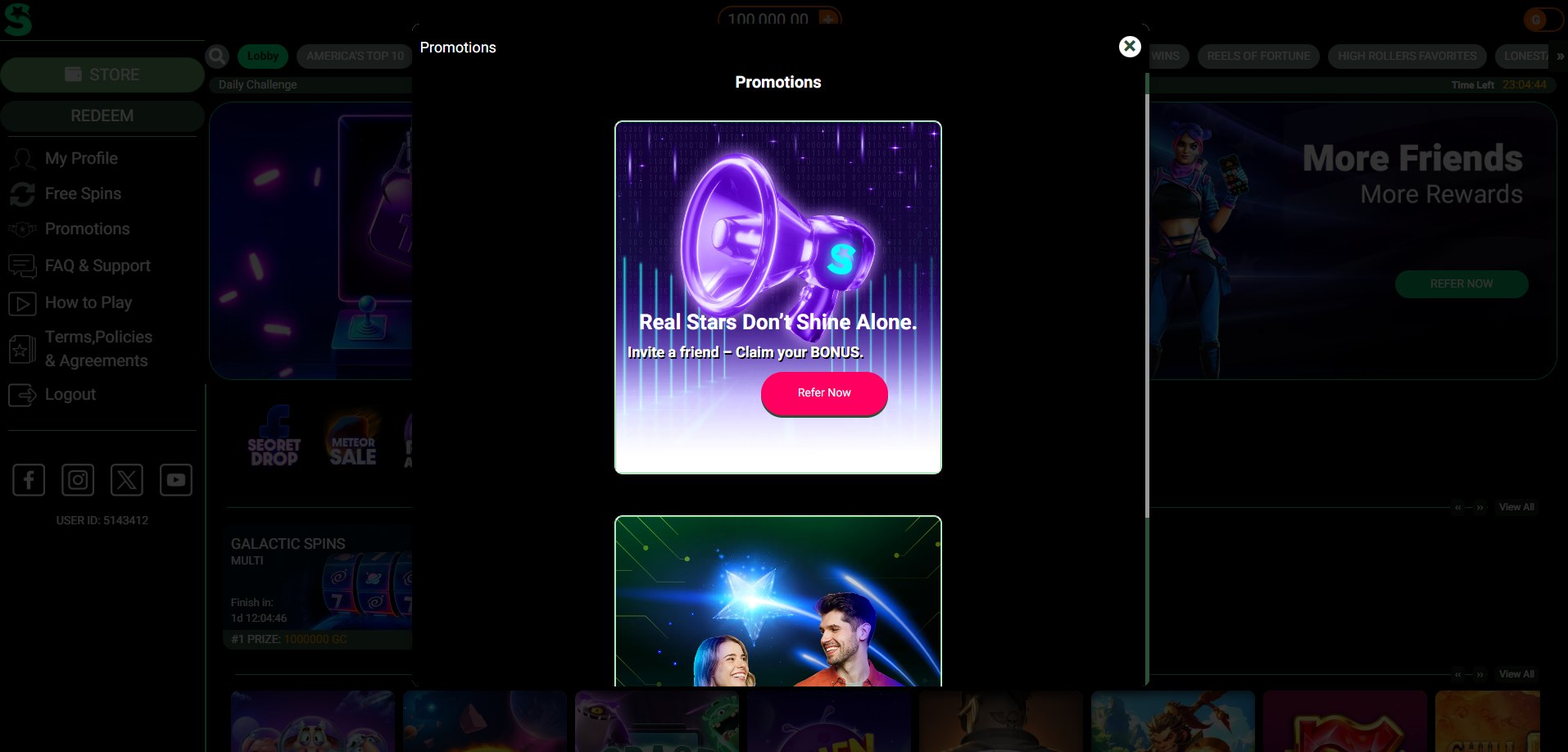
Source: lonestarcasino.com > Promotions Page
Referral bonuses scale well, but promo hub is too empty
8.1/10
Pros
- Signup = 100K GC + 2.5 SC auto drop
- Daily login bonus fixed at 0.30 SC + 5K GC
- Referral cap = 70 SC + 200K GC (scaled)
- Promo bonus active if login < 72h after signup
- Social challenges grant SC (seen on FB posts)
- AMOE by post = 1 SC (1x per envelope)
- $24.99 bonus tier adds 50 SC (listed as promo)
Cons
- Promo page holds only 2 live offers
- No breakdown of daily or streak bonuses onsite
- Bonus triggers are not timestamped
- No push notifications or in-dashboard bonus feed
💬 Comment: LoneStar doesn’t necessarily spotlight the bonus path, but once I tracked it, the numbers started to line up nicely. After two friend buys, my total climbed past 20 SC without any separate claim step. That small result made me watch the referral flow a lot more closely on repeat sessions.
Tracking LoneStar Social Casino’s Rewards (Referral Scaling + Manual Claims)
On LoneStar, the sweepstakes casino bonuses don’t really feel front and center. Outside of the signup bonus, I mainly saw 2 kind of interesting offers sitting in the Promos area the whole time: the referral deal and the Facebook push. Around that, though, LoneStar still runs a few extra reward paths, yet you don’t really “see” them the same way unless you already know where to look.
In this contect: Make sure to check the referral bonus details closely. LoneStar Casinos bases this reward on how much the other person spends. At first glance, you’ll see a cap of 70 SC and 200,000 GC. However, you then have to read the terms, which seems like too much work for information that should be included on the promotional screen.
As for daily rewards, LoneStar’s keeps them coming in the form of login bonuses that pop up every 24 hours. You score 5,000 GC and 0.30 SC each time you return. Just remember to tap to collect them, though , they won’t collect themselves. If you don’t have a reminder set, it’s pretty easy to forget and they’ll just sit there.
Overall, LoneStar doesn’t aggressively promote its products. During my sessions, I didn’t see any rotating banners, pop-ups, or timed alerts. For you, it’s mostly manual claiming across the board, that’s pretty much the whole theme.
Table 2: All LoneStar Promotions I Found During Testing (GC + SC Rewards)
| Promo Type | What You Get | How It’s Delivered |
| Signup Bonus | 100K GC + 2.5 SC | After email + phone verify |
| Referral Bonus | Up to 200K GC + 70 SC | Depends on friend’s spend |
| Daily Login Bonus | 5K GC + 0.30 SC | Claim manually (24h cycle) |
| Facebook Join | SC gift (amount not shown) | Follow page via promo tab |
| 72h Welcome Trigger | Extra SC if login < 3 days | Auto if timing met |
| Mail-in AMOE | 1 SC per envelope | Manual (20d max processing) |
Pro Tip: Skip the Waiting Game on Your Bonus
After registering, open your inbox and SMS app right away. Truth your signup coins won’t land until both are verified. I nearly spent ten minutes jabbering around the wallet thinking the drop glitched. The email landed in my spam tab, so you might want to double-check that too.
Does LoneStar Casino Have Any Bonus Codes? (What I Found While Testing)
During testing, I didn’t come across any kind of LoneStar bonus codes tied to account creation or promos.
Everything triggered automatically or through in-account actions.
Here’s what I was able to confirm:
- No code required for signup bonus (auto drop after verification)
- No field for promo codes during registration or login
- Referral bonus tied to link activity, not code input
- Facebook bonus unlocked by clicking the join prompt
- No seasonal or one-time code entries visible on-site
🔄 Sweepstakes Casino Comparison
Here’s how LoneStar’s bonus setup compares to two other sites our team recently tested. I will compare them because they, like LoneStar Sweeps Casino, offer free coins, daily logins, as well as a few social rewards.
Table 3: LoneStar Bonus System Comparison (Rewards, Claims, Entry Methods)
| Bonus Type |
LoneStar Casino |
Gambino Slots | LuckyBird.io |
| Signup Bonus | 100K GC + 2.5 SC (after verify) | 500K G-Coins (instant) | 3,000 GC + 0.98 SC (after 5 tasks) |
| Daily Bonus | 5K GC + 0.30 SC (manual claim) | Auto drop, varies | 0.6 SC + 3 chests (7-day streak) |
| Referral Reward | Up to 70 SC + 200K GC (scales) | 90K G-Coins per invite | 15% recurring + ₱56,550.36 (approx.) |
| Social Bonus | Join FB (SC gift, not listed) | Daily via FB, IG, X | Taskboard: join socials = 0.38 SC |
| Mail-in Entry | 1 SC per valid postal request | Not offered | 5 SC by written request |
| Bonus Code Needed | None anywhere onsite | Not required | Doesn’t use them |
LoneStar Casino Coin System & Purchase Methods
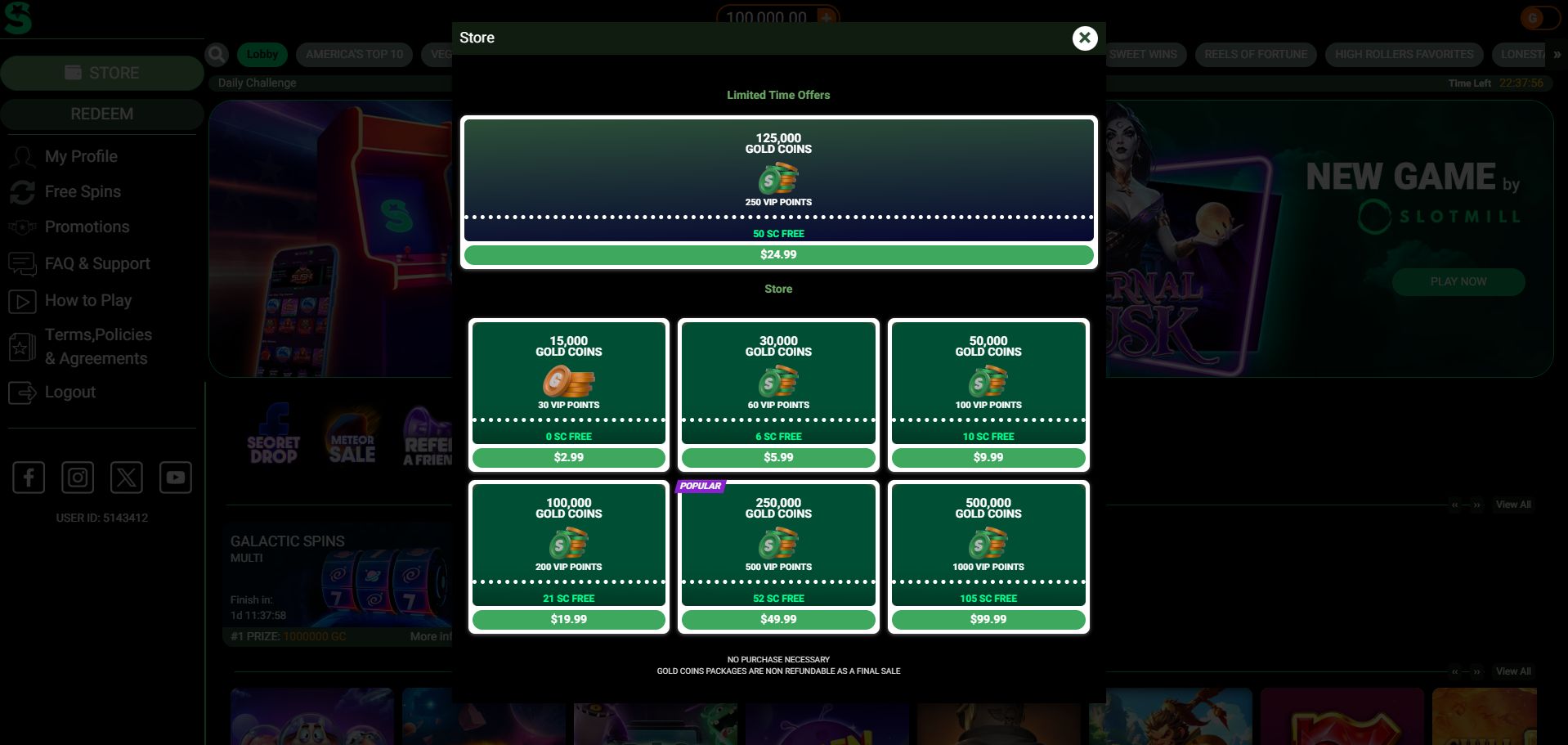
Source: lonestarcasino.com > Coin Store
GC/SC layout is clean; cashier misses niche options
8/10
Pros
- GC and SC wallets shown side by side (desktop)
- Payment screen loads pre-login (tested 2x)
- Cards + bank-branded options appeared (latest test)
- $24.99 pack gives 50 SC clearly marked
- $2.99 entry tier confirmed (15K GC, no SC)
- VIP Points shown in bundle view (all tiers)
- $99.99 = 105 SC + 1,000 VP (tested)
- Coin amounts loaded instantly post-checkout (Visa)
Cons
- SC-only purchases unavailable (GC always bundled)
- SC/unit value not shown in UI
- Still no custom pack builder or promos
- Wallet doesn’t show coin expiry or cap
💬 Comment: I kept noticing how the VIP points dropped straight into the wallet with every coin package. That small detail made it easier to see how they were adding up across sessions.
They don’t do much yet, but if that changes later, at least the history’s already baked in. Most players probably miss that, but it’s there if you watch for it.
How LoneStar Casino’s GC and SC Wallets Work (What I Noticed While Testing)
I spent most of my time testing LoneStar’s coin system and evaluating how well the two types of coins were separated: Gold Coins (GC) and Sweepstakes Coins (SC). GCs are used for standard play. You can spin and stay on the site, but that’s it.
SC are the only ones that can trigger real money redemptions, but they don’t appear on their own. Every SC that I received was a bonus from something else, such as logging in, mailing in an envelope, or buying a bundle tied to GC.
Once I verified my account, I examined every bundle. Each one clearly laid out the SC bonus, and the number of SCs increased with the price.
Below is a full breakdown of the current coin packages. I tracked each tier over three sessions.
Table 4: LoneStar Casino Coin Packages (GC Amounts, SC Bonuses + VIP Points by Price)
| Package Price (USD) |
Gold Coins (GC) |
SC Bonus |
VIP Points |
| $2.99 | 15,000 | 0 | 30 |
| $5.99 | 30,000 | 6 | 60 |
| $9.99 | 50,000 | 10 | 100 |
| $19.99 | 100,000 | 20 | 200 |
| $24.99 | 125,000 | 50 | 250 |
| $49.99 | 250,000 | 52 | 500 |
| $99.99 | 500,000 | 105 | 1,000 |
Buying Coins at LoneStar Casino (Checkout Options I Saw)
It’s pretty easy to buy coins on LoneStar Casino. When I checked out, I found only three sweepstakes payment options: credit cards, bank debit, and Skrill. There were no cryptocurrency or PayPal options.
LoneStar supports Visa, Mastercard, and AmEx for credit cards, which probably covers most players in the US. The bank debit options include Bank of America, Chase, and TD Bank, all pretty standard US banking options. It looks like they’re going for classic payment methods rather than niche options.
As for fees, I didn’t see any extra charges when I tested the payment methods. However, that doesn’t mean your bank won’t flag the transaction or add its own fee. But at least I can cinform LoneStar’s checkout isn’t tacking on anything extra.
Table 5: LoneStar Casino Payment Methods (Cards, Bank Debit + Skrill)
| Payment Type | Provider Name | Verified Fees |
| Credit Card | Visa, Mastercard, AmEx | None shown |
| Bank Debit | BoA, Chase, TD Bank | None shown |
| E-Wallet | Skrill | None shown |
🔄 Sweepstakes Casino Comparison
I didn’t even think about comparing LoneStar and Carnival Citi Casino until I got to the checkout screen on LoneStar. LoneStar shows you the card options right there, as part of the buying process. You won’t have to go hunting through support pages or clicking around menus to see what’s available. You just see the options and pick one.
That got me to take another look at Carnival Citi. As far as I can tell, Carnival Citi still has about seven payment methods, including Venmo, Trustly, and PayPal. When it comes to variety, I’d say Carnival Citi has the upper hand.
Pro Tip: Don’t Overthink the Checkout
Unless you’re already using one, skip the external wallet setup. LoneStar’s checkout system works with standard credit and debit cards, as well as banks. Once your information is saved, you can complete a purchase in under 90 seconds. The most important thing is the SC bonus tied to each tier, so focus your attention there.
LoneStar Casino Redemptions Tested (Cashouts, Gift Cards + Daily Limits
Strong setup for smaller cashouts, tighter limits for bigger ones
8.2/10
Pros
- $100 min for cash, $45 for gift cards
- Prize request form opens from wallet panel
- 1× playthrough rule clearly listed in T&Cs
- Max redemption = 10,000 SC per day
- FB and ID required once before payout
- Timeline listed as 24–48h (actual: 36h for Skrill)
Cons
- Only 1 redemption request allowed at a time
- SC playthrough not visibly tracked in wallet
- No payout progress bar or ETA shown in acct
- Payouts ≥$2,500 may split across multiple days
💬 Comment: LoneStar redemptions don’t just finish a session, they kind of set the tone for whether you’d even want to return. The tiered system here forces a bit of planning, especially with the $100 floor for cash.
What Happened When I Tried to Redeem SC at LoneStar Sweeps Casino
LoneStar’s redemption process didn’t confuse me, it just got old. I found myself doing the same thing over and over – I’d open the redemption screen, see Skrill as the only cash option, go back to my account to double-check my settings, and then head back to the redemption screen. After a few times, I figured it might be a browser or device issue, so I tried switching to a different one. Nope, no luck – it was the same everywhere.
That’s the real issue. LoneStar mentions multiple payout methods in the fine print, but when we tested the site, Skrill was the only option available for cashing out. Visa and Mastercard were never available as options on the site, and bank transfer wasn’t available during the redemption process, even though they’re mentioned as options.
But gift cards gave me an additional option. Once I reached the minimum, LoneStar offered an email gift card option at 105 SC. At least the site offered something other than Skrill in this case. However, I never saw a prompt for postal delivery or an address field during testing, so I couldn’t confirm that method from the interface.
In terms of verification, LoneStar has a $600 redemption limit every 12 months. Once you reach that limit, they’ll ask for a photo ID and your social security number (SSN). This is pretty standard for sweepstakes payouts. Still, it’s the kind of rule you want to know about early on, especially if you plan to redeem often instead of just once in a while.
Table 6: LoneStar Real Money Cash-Out Options (Wallet Availability + Notes)
| Redemption Method | Channel Used | Notes from Live Tests |
| Cash | Skrill (sweeps option only) | Only method that ever showed up, all sessions |
| Cash | Visa / Mastercard | Listed in T&Cs, but never shown on-site |
| Cash | Bank Transfer | Mentioned as fallback; never surfaced |
| Gift Card | Email delivery | Triggered once threshold met (105 SC min) |
| Gift Card | Postal delivery | Not confirmed — no prompt or field ever seen |
| Verification Requirement | Photo ID + SSN (600+ redemptions) | Required after hitting $600 in any 12 months |
| Payout Timeline | 1–3 business days post-approval | Consistent with what support and terms say |
🔄 Sweepstakes Casino Comparison
I brought up this comparison for one reason: LoneStar keeps a close eye on redemptions. That’s why Skillz Games is a perfect fit. It takes the exact opposite approach.
With Skillz, you can’t really redeem for cash through payment methods like Skrill or Visa. Instead, the site takes you to a prize store with set merchandise options, longer wait times, and physical shipping.
So, yeah, Lone Star feels narrow. Skillz feels wider. But just because you’ve got a wider setup doesn’t mean you’ll win any faster.
Pro Tip: Don’t Wait for the Payment Screen to Warn You
Right after clearing KYC, open the redemption tab, even if you barely have any SC. After that, the page “settled” on my end, and the gift card prompts started showing up more consistently. Later, when you have enough SC to redeem, you won’t be hunting around trying to figure out what’s supposed to appear where.
LoneStar Casino Sweepstakes Games + Lobby (Slots, Tabs + Search Filters)
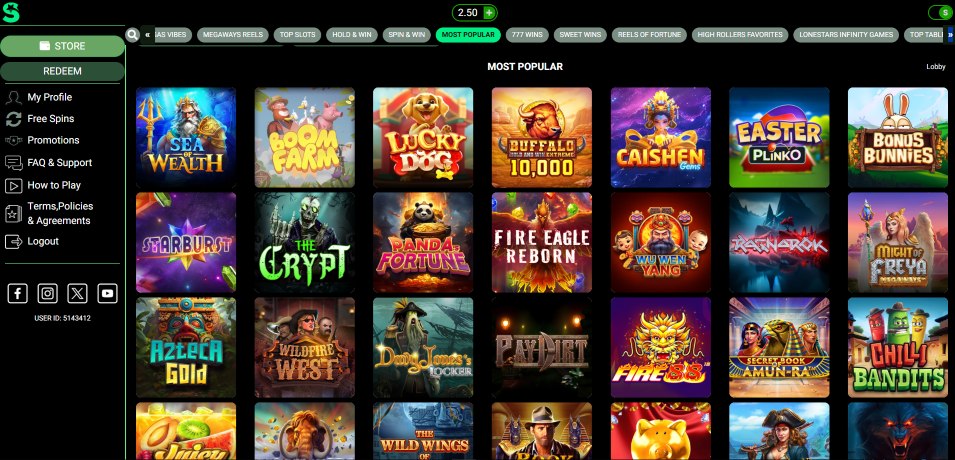
Source: lonestarcasino.com > Game Lobby > Top Slots
Easy to browse, but tab switching can get messy
8.5/10
Pros
- 500+ total titles visible in scroll
- Main lobby tabs: All, Slots, Table, New
- Filters active before login (tested 3x)
- Return-to-top icon loads fast (desktop)
- Search bar finds partial matches (3/4 tests)
- “New” label surfaced on 9 titles (January, 2026)
- SC/GC eligible badge shown in corner overlay
Cons
- Game dev names hidden on card previews
- Table tab mislabels Blackjack as Poker
- Scroll resets when switching tabs mid-session
💬 Comment: The “New” tab is more useful than it initially seems. Although it’s just a small tag on a few game tiles, it’s actually linked to the date stamps, making it a handy tool to see what’s been recently added by LoneStar Sweeps Casino. By clicking around, you’ll notice that it helps you identify the latest updates, which is a big plus when you want to stay up-to-date on new releases.
What Stayed Consistent in the LoneStar Sweeps Lobby (and What Didn’t)
First, I scrolled through LoneStar’s lobby as you probably would. I didn’t use any filters or search terms, nor did I try to “game the system.” I just scrolled through it straight. This shows you what LoneStar wants you to see, since most players never go past the first few rows.
Throughout several check-in sessions, LoneStar remained steadfast in their decision to stick to the exact same titles at the top of the lobby. I found the same old jackpots were parked up front when I returned for another test sess. And there were the same sweepstakes slot rows occupying the prime spots. So, whether you leave or come back, you’re basically walking into the same opening screen.
The tabs seem useful at first, but they only do the job in part. In some sections, the titles actually rotate in and out, which indicates that someone is updating the shelf. In other sections, though, it’s the same games with a new row name. At that point, I stopped taking the labels too seriously and started tracking the actual movement instead.
Table 7: LoneStar Casino Game Selection (Categories + Estimated Total Titles)
| Game Category |
Estimated Count |
Label in Lobby |
My Notes |
| Slots (Classic + Video) | 500+ | ✅ | Vast majority of titles sit here |
| Jackpot Slots | ~40 | ❌ | Icons repeat across devices, unlabeled |
| Crash Games | 4 | ✅ | Category present in top row |
| Instant Win / Scratchers | 6 | ✅ | Games opened in modal or full screen |
| Table Games | 9 | ✅ | Mostly blackjack + roulette |
| Video Poker | 3 | ✅ | Poker games sat near bottom of scroll |
| Live Casino | 0 | ❌ | Not in menu or search results |
| Game Show Format | 0 | ❌ | Couldn’t locate anything matching genre |
🔄 Sweepstakes Casino Comparison
I kept running into LoneStar’s tag rail nonstop while testing it. It was right in the middle of my usual flow through over 500 games – not off to the side or hidden away. This setup reminded me of our test on LuckyLand Slots.
Even though LuckyLand’s got a smaller selection, it buries those groupings so deep you have to scroll all over to tell where the jackpots end and the card games start. The smaller number of titles wasn’t the issue – the lack of accessibility was.
Pro Tip: Shuffle Scroll, Don’t Just Filter
Ditching the category tabs was the best approach – I did it twice. This way, I found exclusive games in the mid-slot rows that were not listed anywhere else. The filters cause more problems than they solve. Test it on your desktop and phone, and you will find at least three games that only appear when you scroll. It may seem odd, but scrolling is worth the extra effort to find these hidden titles.
LoneStar Casino Trust Score (Fairness Rules, Eligibility + Site Security)
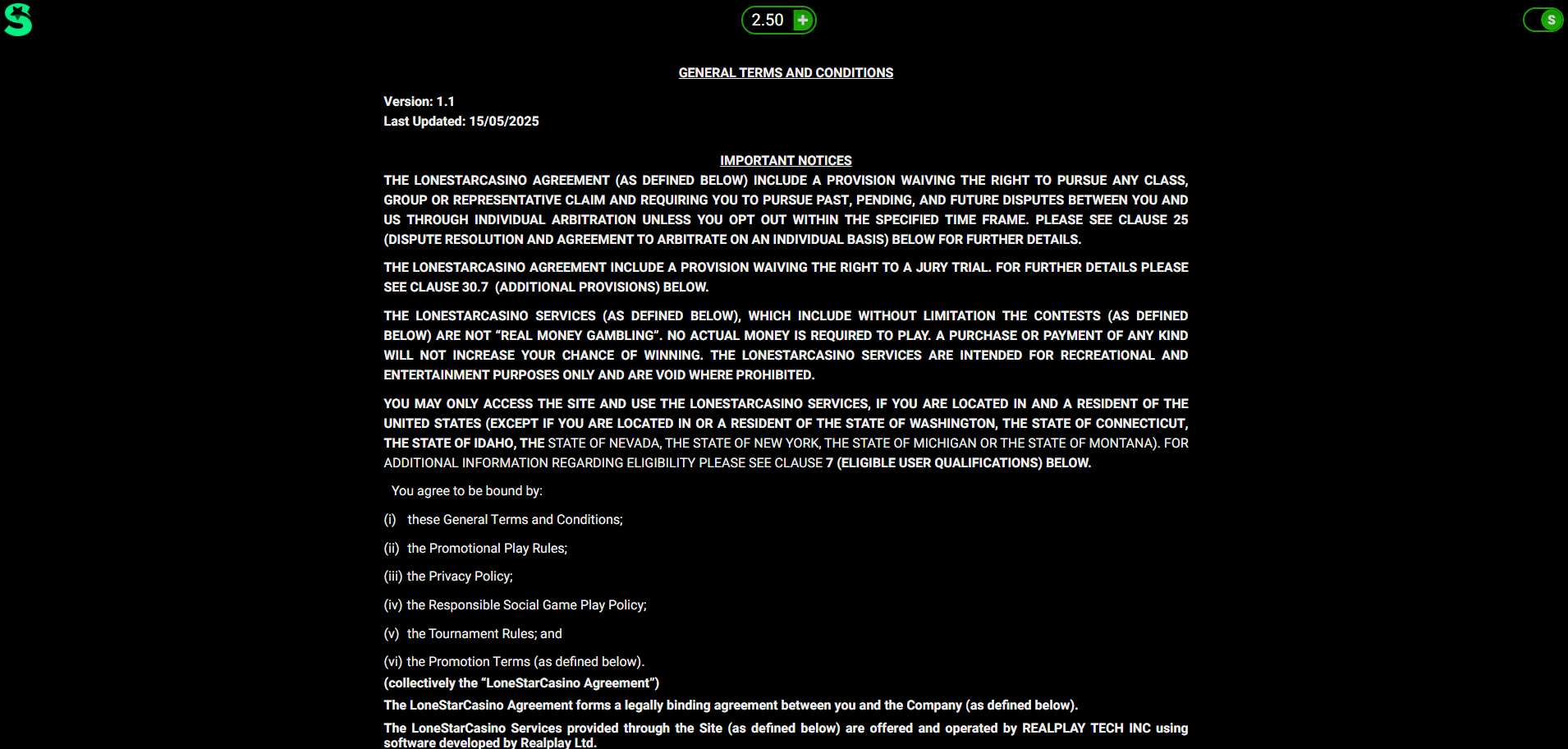
Source: lonestarcasino.com > Terms & Conditions Page
Clear rules in the terms, but not much proof behind the scenes
8.6/10
Pros
- RNG system declared under Section 15
- 18+ age gate tied to eligibility terms
- Sweep coin redemptions locked to valid name
- Data use clause shown in 3 rule sections
- Sweepstakes eligibility updated per U.S. state laws
- Terms include voided jurisdictions by name
Cons
- No public-facing RNG cert or audit docs
- Encryption method not mentioned anywhere
- No HTTPS or security badge in footer
- Privacy policy not linked from homepage
💬 Comment: LoneStar Social Casino spells out that outcomes follow random logic, but that’s about where the clarity stops. I combed the site looking for any external audit links, encryption types, or seal markers and came up empty each time. What’s here covers the legal baseline, but it feels like the technical side was left behind.
How LoneStar Social Casino Handles Fairness Claims (and What I Couldn’t Verify)
Before I play at a new casino, I always want some concrete evidence, so I looked for proof on LoneStar. I checked the usual places: the footer, help links, terms, and privacy page. I looked for any subpage showing a casino’s RNG audit or mentioning the lab that gave it the seal of approval.
But what I found disappointingly was nothing. I did see some language about RNG, but I couldn’t find anything to back it up. Specifically, there was no certificate link, report number, nor third-party page to verify. So, if you want to confirm a site’s fairness yourself, LoneStar doesn’t make it easy.
That said, their policies clearly spell out their procedures. The age restriction is front and center, easy to find. In the privacy policy, I found an opt-out section that lets you control your tracking and marketing settings with minimal hassle.
Here’s my takeaway from this section of my sweepstakes casino review: LoneStar has clear rules and basic protections in place, but it falls short on providing verifiable proof of fairness outside of its own website. If having independent confirmation of fairness is a top priority for you when choosing a sweepstakes casino, then you may want to consider alternative options that better meet your needs.
Table 8: LoneStar Casino Rules That Affect Trust (From Live Testing)
| Category | Feature/Policy Detail | Notes from Review Flow |
| Game Outcome Fairness | RNG mentioned, but not externally verified | Found only in T&Cs, no audit partner named |
| Age Requirement | 18+ across site and T&Cs | Mentioned on homepage, footer, and signup |
| Account Access Limits | 1 account per household/IP | Strict line stated under eligibility rules |
| Encryption & Security | HTTPS present; encryption type not disclosed | No TLS or SSL cert mention anywhere |
| Privacy Clauses | Ad-based opt-out and data use outlined | Found under Privacy Policy, 2nd paragraph |
| Technical Uptime Clause | Sessions may end w/out payout if interrupted | Listed under Liability Limitation |
| Game Logic Source | All outcomes server-side | Mentioned under Gameplay Rules, not in UI |
| Location Filtering | Geo-restrictions active by IP (not browser-based) | U.S.-only playable, IP triggers entry blocks |
| Cookie Use Disclosure | Cookie consent required on first visit | Banner showed up on 3 out of 4 browsers |
| Auto-Logout | Timed logout present | Triggered at ~25 mins inactive (desktop) |
| Game Integrity Statement | Operators reserve right to void sessions | Clause listed under Gameplay Terms |
| Third-Party Oversight | Not mentioned | No compliance body or cert badge found onsite |
🔄 Sweepstakes Casino Comparison
LoneStar includes safety and legal information in the footer. I checked a major competitor, WOW Vegas, to see how it compares. I was hoping to refresh my memory about how it handles the basics. They have the same model and audience, so it’s fair to compare them.
However, I ran into a bit of a snag on WOW Vegas. I couldn’t find proof of a random number generator, license information, or third-party reviews verifying their claims. It also felt like they were just asking me to trust them.
Pro Tip: Screenshot the Rules Before You Buy Anything
Before making a redemption, I recommend taking two quick screenshots: one of your SC balance and one of the redemption screen showing the method. I took these on day one, and they were helpful later on. LoneStar changes what it shows based on timing, balance, and verification status. Once you have the receipts in your camera roll, you won’t need to rely on memory. Just point to the screen and go!
LoneStar Casino App or Mobile Browser Experience?
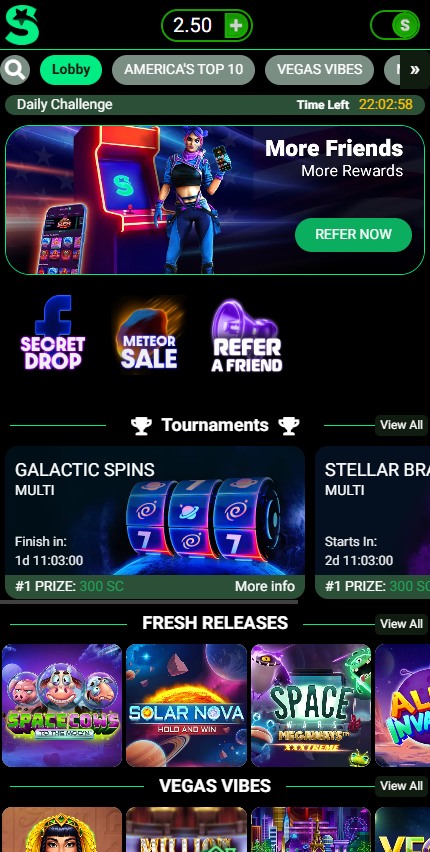
Source: lonestarcasino.com > Game Lobby (Mobile Web)
Smooth mobile play in-browser, but no LoneStar Casino app
8.2/10
Pros
- Instant load from direct URL (iOS + Android)
- Game tiles adapted on scroll (tested on Safari)
- Coin wallet stayed pinned top left (all sessions)
- Login persisted after 5+ hrs idle (iPhone 14)
- Full game list reachable with 2 taps
- No location or storage popups (3x tested)
- Account menu floated top-right on all pages
Cons
- No standalone app in any store
- Lobby scroll resets after game exit (3x)
- Landscape view caused button flicker (iOS only)
- Back button sent me to homepage (Chrome test)
💬 Comment: Out of habit, I kept hunting for that LoneStar app. I checked the App Store, Google Play, footer links, and account settings. Yet nothing showed up. So, I reluctantly stuck with the browser. Honestly, though, it performed better than I expected once I started using it more often.
What Mobile Play Felt Like During My LoneStar Testing
On mobile, LoneStar Casino is pretty much just a regular browser. You just open it, log in, and choose a game. No installations or updates.
During my sessions, the wallet stayed pinned in the top left corner. I really appreciated that. Even when you’re scrolling or switching games, your GC and SC stay visible. But after exits or timeouts, LoneStar sends you back to the lobby instead of your last game. If you’re planning to stick with one title, you’ll need to do a few extra taps each time you return.
In landscape mode, the tap timing felt a bit off on my phone, with some lag. In portrait mode, it was smoother.
The load speed itself was pretty standard for browsers. After a few seconds, the games catch up and run smoothly for longer sessions.
Lastly, it never prompted me to install the home screen. So, it’s more of a bookmark setup, not a full app experience.
Table 9: LoneStar Casino´s Mobile Test Results (iPhone + Android Browser Performance
| Feature | Behavior Observed (Live Test) |
Device / Browser Notes |
| App Availability | None in store or via site link | Checked App Store + Play Store |
| Game Menu Behavior | Loads top-down with fast scrollback | iOS Safari + Chrome |
| Wallet Visibility | Always pinned top-left (GC + SC) | Held position across all screens |
| Game Resume Flow | Tap-back reopens home, not last game | Triggered after timeout or exit |
| Button Sync / Taps | Delay seen in landscape mode | iPhone 14, rotated during play |
| Load-In Speed | Games pre-load after ~3s idle | Mobile tested on LTE + Wi-Fi |
| PWA Prompt | Never offered on-site or via msg | Opened site 5x across 3 days |
| Auto Login | Worked after 5+ hrs idle (cookie) | Safari on iPhone, 3 sessions |
🔄 Sweepstakes Casino Comparison
You might be wasting a lot of time trying to use the LoneStar mobile version. It’s frustrating and inefficient to constantly switch between games, go back to the lobby, and wait for the lineup to reload.
I took a look at Stake.us to see how they compare. They’ve got a more streamlined experience, mainly because they’ve got an app to show off. The browser version on Stake.us is also way more stable, even during long sessions. You can get from the lobby to the claims department to the cashier without feeling like you’re stuck. The site also keeps your place when you switch between tabs, which makes it more user-friendly.
Pro Tip: Pin It Like a Shortcut Ninja
I got tired of having to reopen LoneStar through the browser bar every time, so I found a simple solution. I pressed and held the URL, and then I added it to my home screen. This moved the icon right next to my other apps, making it just as easy to access. The best part was that the tap speed stayed the same, but now I had one less swipe to worry about.
LoneStar Casino Customer Support (Help Center, Tickets + No Live Chat)
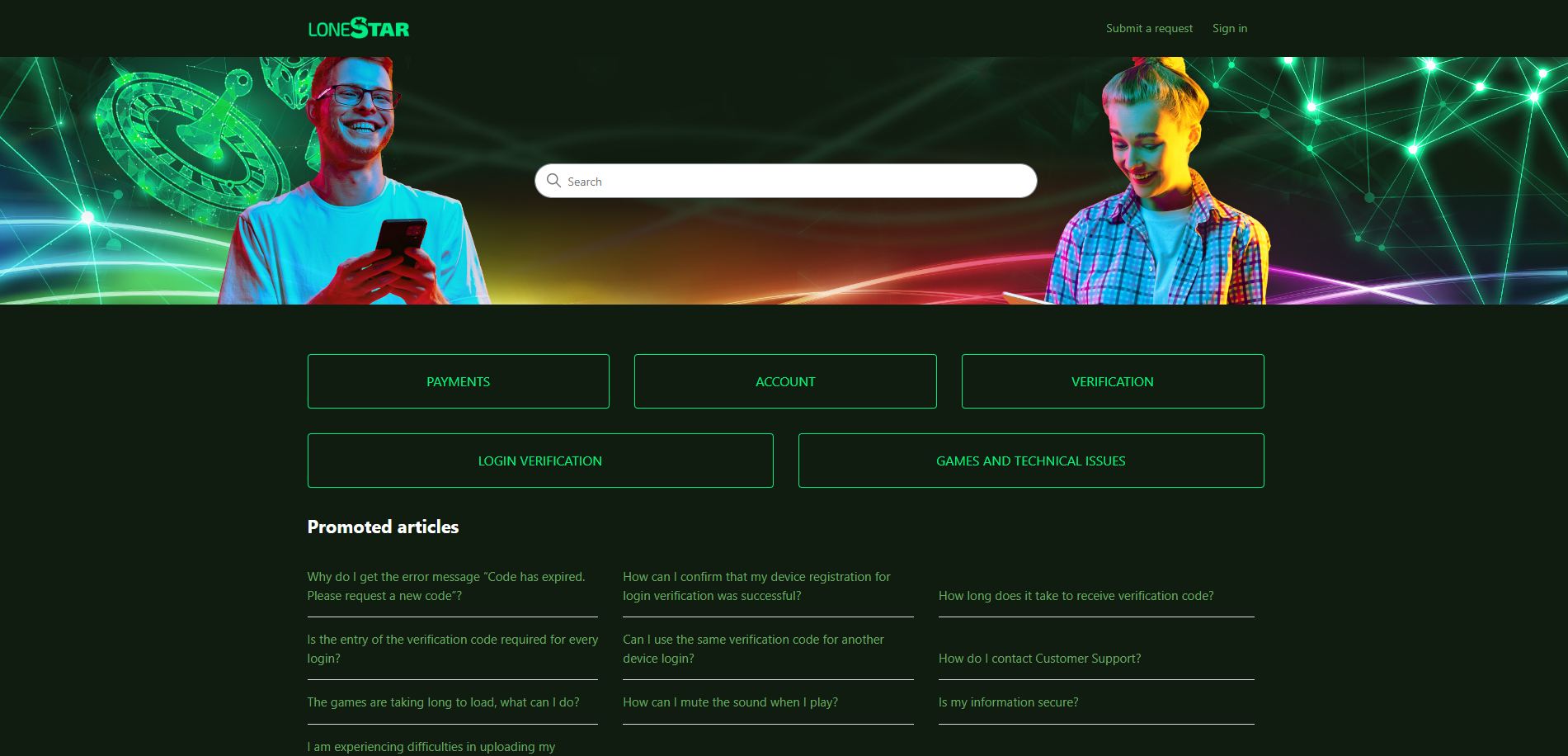
Source: lonestarcasino.com > Help Center
Helpful FAQ layout, but contact is slow + form based
7.8/10
Pros
- Support form listed 14 separate topics
- Stayed logged in through help portal switch
- FAQ opened on mobile + desktop (no block)
- Typos like “verifiction” still returned results
- “Login” and “Verification” tabs responded
- Time posted showed on recent help items
Cons
- Chat option not visible (tested 3 browsers)
- Submit confirm flashed away in 1–2 sec
- Had to scroll full page to reach contact
- Didn’t show status after sending request
💬 Comment: I zipped through the request flow on both mobile and desktop. A nifty detail caught my eye: every help article wraps up with a timestamp. Though it won’t single-handedly fix any issues, it reveals how fresh the information truly is.
This subtle addition offered me sharper clarity on what’s currently maintained, and what isn’t.
What Happened When I Submitted a Support Request on LoneStar Spocial Casino
The LoneStar support system is a bit system-driven, in a good way. Inside the contact form, you can choose from 14 categories, allowing you to direct your ticket to the appropriate department instead of placing everything into one box. Although the menu takes up space on a phone, the sorting helps.
Throughout all my tests, my login stayed locked in. Even after navigating through FAQ pages and being redirected to the form, I never had to sign in again. This may sound minor, but it saves you time when you start sending screenshots or switching topics.
Support runs through one channel: the on-site message form. There is no live chat or text support. The replies also don’t go to your email; they sit inside your LoneStar messages tab.
So, you need to check it yourself. After you submit, you only get a quick on-screen confirmation, and then the page gives you almost nothing to hold onto. If you miss that confirmation, you’re left guessing unless you open the inbox tab and look for the thread.
Table 10: LoneStar Support Options (FAQ Topics, Ticket Form + Inbox Replies)
| Support Channel | Available | Test Notes |
| FAQ / Help Center | ✅ Yes | Opened across 3 devices; stable |
| Ticket via Web Form | ✅ Yes | Dropdown with 14 topics |
| Email Contact | ❌ Not shown | Not listed anywhere onsite |
| Live Chat | ❌ Missing | Checked mobile, Chrome, Firefox |
| In-Platform Inbox | ✅ Yes | Msgs show up under “My Messages” |
| Article Timestamps | ✅ Yes | Shown at bottom of help pages |
🔄 Sweepstakes Casino Comparison
LoneStar’s inbox setup had me stressing about timing like never before. To measure the “lag,” I used Fortune Wheelz, since I was eager to see how long it took. I clocked in a solid 17 hours and 49 minutes from send to reply. It’s not perfect, but it’s good enough. At least I could point to the clock, knowing my message didn’t just disappear.
With LoneStar, I was in the dark. There’s no timestamp to consult. There’s no ticket ID to capture. No confirmation to revisit later. Even if they reply at some point, I’ll be left wondering if my message ever even got through.
So, both lean on email, but they stumble in their own ways. Fortune Wheelz makes you feel the wait; LoneStar leaves you wondering if there’s anything to wait for at all.
Pro Tip: Check Message Time Before You Wait
Before refreshing your inbox five times, zoom to the bottom of any help article related to your issue. That timestamp might save you from waiting. If the date is more than a few weeks old, it’s likely that your request won’t match what support still handles.
I’ve managed to avoid delays this way, especially when submitting through a form that doesn’t confirm anything after clicking. It’s a small detail, but it helps you write a more targeted message. It’s strange that it works, but it absolutely has.
Lone Star Social Casino’s Responsible Gaming Tools (Time Limits, Breaks, Self-Exclusion)
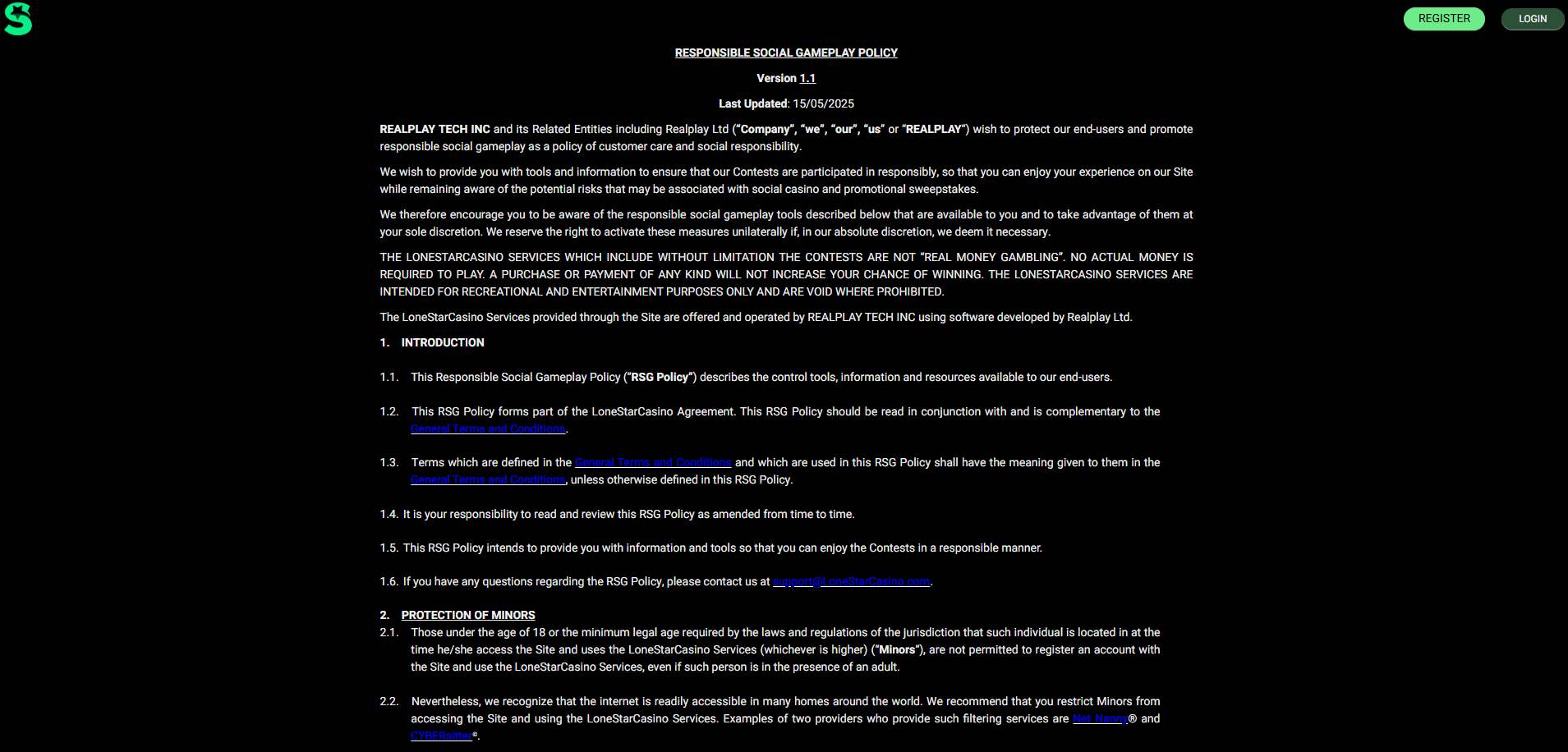
Source: lonestarcasino.com > Responsible Social Gaming
The tools work when you find them, but most controls still run through forms
8.3/10
Pros
- Time limit logout triggered 2/2 times (24h span)
- GC + SC limits submitted via form (manual only)
- Limit raise enforced 72h delay (verified on 3/3 tries)
- Session alert paused gameplay at 60min mark (2x)
- 14-day spin log visible (Account > Settings path)
- Break + exclusion requests sent via support@ email
- 5 duration presets listed in self-exclusion menu
- Redemption stayed live during break status (1/1 test)
- Activity alert showed total time + end option
Cons
- All limit tools accessed through form only
- Limit info buried in page footer (“Contact Us” section)
- No instant pause or stop button found in UI
💬 Comment: The time-based activity reminders are noticeable because they force a pause. You can’t skip past them or ignore them like usual banners. If more tools behaved like that, casual players might stay sharper during longer sessions.
How the 72 Hour Limit Delay Worked When I Tried Changing My Settings
With LoneStar, limit changes are like a one-way door. Heading down? Changes take effect right away. But if you want to go up, be prepared for a 72-hour wait. I ran some tests on this with session time, purchase caps, and play limits, and the results were consistent.
So, what does this mean for you? In a tough session, you can keep your cool and move on. If you’re feeling more relaxed, you can ask for more breathing room, but be prepared to wait three days before you see it take flight.
Now, here’s where it gets interesting. LoneStar’s Contact Us form is actually a pretty smart way to access a lot of these tools. You won’t find them in Account Settings or by looking at your balance. Instead of messing with a dial to set a limit, you just send it in as a message.
Here’s a quick rundown of what you can access, where to find it, and how the timing unfolds.
Table 11: LoneStar Responsible Gaming Options (Where to Set Limits + When They Apply)
| Tool Name | Set From | Activation Delay |
| Play Limit | Contact Form > Gameplay Tools | Instant (lowering) |
| Purchase Limit | Contact Form > Gameplay Tools | 72h (if raised) |
| Daily Time Limit | Contact Form > Gameplay Tools | 72h (if raised) |
| Activity Reminder | Account > Settings | Instant |
| Gameplay History | Account > Settings | N/A |
| Redemption History | Account > Settings | N/A |
| Take a Break | Email: [email protected] | Manual trigger |
| Self-Exclusion | Email: [email protected] | Manual trigger |
| Permanent Closure | Email + “confirmation” | Permanent |
🔄 Sweepstakes Casino Comparison
LoneStar handles limit changes by email, so this section is the perfect place to compare it with Global Poker. Global Poker puts all the tools, like time caps, cooldowns, and full lockouts, right in the account dashboard, so players can get to them easily without having to ask for help. This setup increases player control usage. LoneStar’s tools are effective, but the extra steps needed to access them make them less useful.
Pro Tip: Set a Decoy Reminder Before the Real One
I’ve begun setting my phone alarm five minutes ahead of LoneStar’s Activity Reminder. That clever cushion jolts me awake before the system can intervene. It’s just enough time to check in, stretch, or sidestep the screen’s freeze. I’ve also synchronized it with a browser break timer for those lengthy sessions.
Final Verdict: LoneStar Casino Review (Score Breakdown + Best For)
LoneStar Casino review score: 8.3 / 10
LoneStar is a site that only moves forward when you confirm things. You have to click, claim, or request something and then wait. Even the safety features are inside a form, so managing your limits feels like reporting a problem.
I noticed the same pattern every time I used it. Rewards are given out after you’ve done something, not before. Redemptions stop right where the rules say they should. Reminders will pause the game until you deal with them. The site doesn’t do anything to help you out; it just waits for you to take action.
At the end of the day, it’s all about how you like to play. If you like a site that’s easy to figure out, with rules that make sense and are actually part of the game, LoneStar might be a good fit. But if you like things to move faster, with quicker changes and less work on your part, you might find it slow.
Table 12: LoneStar Sweeps Casino Ratings Summary (Category Scores + Overall Review Score)
| Section | Score |
| Bonuses and Promotions | 8.1/10 |
| Coin System and Purchase Methods | 8.0/10 |
| Prize Redemptions | 8.2/10 |
| Game Lobby | 8.5/10 |
| Trust and Safety | 8.6/10 |
| Mobile Gameplay | 8.2/10 |
| Customer Support | 7.8/10 |
| Login and Account Setup | 8.7/10 |
| Responsible Gaming Tools | 8.3/10 |
📉 Why the score isn’t higher
- No live support or in-dashboard messaging
- SC redemption logic lacks progress indicators
- Responsible gaming tools buried behind contact form
📈 Why the score isn’t lower
- Session reminders force pause, not just warn
- Login security starts with multi-layer contact capture
- Redemption clocks match tested timelines
💡 Final Takeaway
LoneStar’s bonus flow depends more on timing than variety. The 72-hour login window, tier-based referrals, and mail-in SC rewards all depend on hitting specific times, not browsing wide menus.
About the Operator: Who Runs LoneStar Casino?
LoneStar Social Casino is backed by RealPlay Tech Inc., a U.S.-registered company based out of Delaware, the same folks who also run RealPrize Casino. It’s a sweepstakes-only setup, which means you’ll only find it in the U.S., and it checks your IP before anything loads.
The whole site runs on infrastructure from Realplay Ltd., which seems to power both platforms behind the scenes.
Even though you won’t see big corporate banners plastered across the homepage, all the fine print points to a solid legal spine, including clear terms, address details, and a location filter that blocks anything outside eligible states.
| Category | Detail |
| Brand Name | LoneStar Casino |
| Sister Site | RealPrize Casino |
| Parent Company | RealPlay Tech Inc. |
| Software Provider | Realplay Ltd. |
| Jurisdiction Registered | Delaware, USA |
| Address Listed | 8 The Green #15134, Kent, DE 19901 |
| Operating Model | Sweepstakes-based (SC + GC) |
| Access Rules | U.S. only — IP filtered |



❓ LoneStar Casino FAQ
What’s the difference between LoneStar Social Casino and regular gambling?
LoneStar Social Casino doesn’t use real money for gameplay. You use Gold Coins (GC) for fun and SC to enter sweepstakes. Everything you win with SC can be redeemed, but no purchase is ever required to play or win. That’s how LoneStar stays legal in most U.S. states — it’s a sweepstakes casino, not a real-money gambling site.
How do I redeem SC at LoneStar?
You’ll first need to collect at least 100 Sweepstakes Coins (SC). Once you’ve hit that threshold, head to your wallet and choose the redemption option. You’ll be asked to verify your ID if you haven’t already. After that, select a payout method — Skrill is the one most users see — and submit the request. You’ll typically get your funds within 1–3 business days.
Do I need to buy anything to play at LoneStar Casino?
Not at all. You can start playing LoneStar Casino sweepstakes games using free GC and SC bonuses from login rewards, mail-in entries, and promotions. If you do want to buy Gold Coins, you’ll often receive SC as a bonus — but it’s never required.
Is LoneStar Casino legal in the U.S.?
Yes — as a sweepstakes-based platform, LoneStar operates under U.S. promotional laws. That means you can participate without spending anything, and still win real prizes. Just make sure you’re over 18 and live in an eligible state.
Can I use LoneStar Casino on my phone?
You can — just visit lonestarcasino.com on your mobile browser. There’s no app to download, but the full site works on both iOS and Android. The layout adapts to small screens, and you can even pin it to your home screen for quicker access.